
Using Bitvise SSH Server in a domain
Bitvise SSH Server fully supports environments with Windows domain, domain forest, and Unix realm authentication. Changes to Active Directory settings are not necessary to authenticate against the SSH Server, except when using:
Domain accounts with public key authentication and without a password cache.
Virtual accounts with backing Windows domain accounts and without a password cache.
Active Directory permissions for password-less logon
If you would like to use Windows domain accounts with public key authentication, or as backing accounts for virtual accounts; and if you do not wish to configure passwords for these domain accounts in the SSH Server's password cache; then you will need to ensure that the SSH Server has read permissions to user data in the Active Directory.
A default Active Directory installation may grant the necessary read permissions by default – for example, through the Active Directory group Pre-Windows 2000 Compatible Access. If default settings have been changed, a permissions issue might arise when trying to use domain accounts with password-less logon.
If the SSH Server's log files indicate permission-related issues when trying to use domain accounts with password-less logon, grant the necessary read permissions as follows:
On the Domain Controller, open Active Directory Users and Computers under Administrative Tools.
In the View menu, enable Advanced Features.
Right click on the Users container in the tree view. Click Properties.
In the Security tab of the new dialog, click Advanced.
In the Permissions tab of the Advanced Security Settings dialog, add the computer running Bitvise SSH Server:
Set Applies to to This object and all descendant objects.
Enable the permissions List contents and Read all properties.
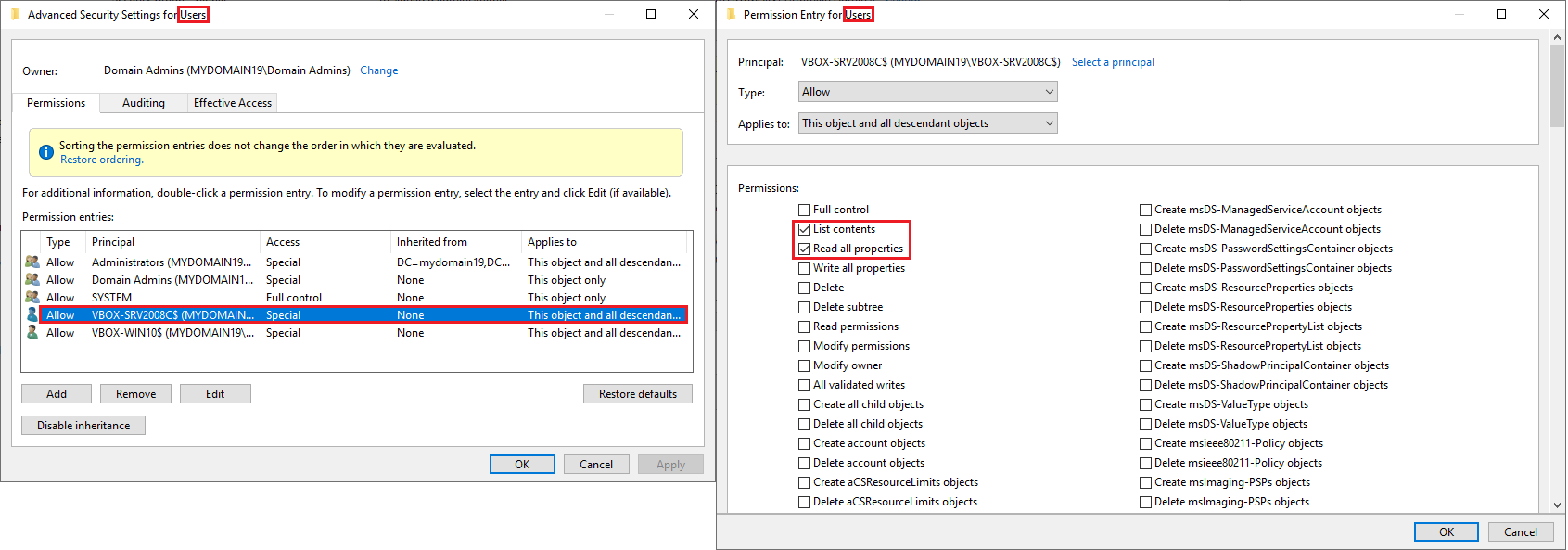
These are recommended settings which are intended to be future-proof and easy to configure. However, it is possible to configure a more restricted alternative.
Windows domain order
Using default SSH Server settings, domain users can log in without providing a domain as part of their username. Usernames do not have to be fully qualified to log in.
In addition, a Windows domain order feature is supported in Advanced settings for administrators who wish to explicitly configure the order in which non-fully-qualified usernames should be looked up. This can be used to ensure predictable results.
Loading Windows profiles
When configuring Bitvise SSH Server to provide SFTP and SCP access for domain users, you may want to avoid configuring settings that will cause loading of Windows profiles. Users may have large Windows profiles which, if they need to be loaded, may delay session startup. A Windows profile may also become corrupted from being loaded and unloaded many times, which can prevent connectivity until the profile directory is manually deleted.
Any of the following conditions will cause Bitvise SSH Server to load a user's Windows profile:
Map remote home directory is enabled for the user or group in Advanced settings.
Map remembered shares is enabled for the user or group in Advanced settings.
There is an On-logon or On-logoff command configured to run in the user's context, and the Do not load profile option in the settings for the On-logon or On-logoff command is disabled.
A terminal shell is opened, or an exec request is executed by the client – except if Shell access type is set to BvShell and the option Load profile for BvShell is disabled.
The client starts an SCP or SFTP session, and the setting Load profile for SCP and SFTP is enabled for the user or group in Advanced settings.
To make sure the SSH Server does not load Windows profiles, verify that none of the above conditions apply.